03/03/2025 Chrome Clipper Tool Extension ~ How to Bypass the Alert to Remove It
-
@queenofrocknroll Well, there is a way to "roll back" your computer to get an earlier version of Chrome, but that doesn't promise you'll be able to reinstall the Clipper. You could simple downgrade the version of Chrome you have now, exchanging Chrome for an previous version. I've looked into it and cannot find an easy way to do this without advanced technical knowledge... Let me see if I can find an easier way for you. Are you using a desktop/laptop/PC or a phone/tablet.
-
@funkyjunkygypsy Oh, well, don't worry, if it's too much trouble
I got to install it on "microsoft edge" (another different browser)What i'm really scared about rn is that urstyle remains available/online, because honestly i love this website so much

-
@funkyjunkygypsy no cyclone coming thru tomorrow night it’s stalled and it has been over half a century since o e of these have come far south. Apparently it sounds like a jet plane for a few hours. We are in its path going to be hit big time.
-
@queenofrocknroll Well, I can't speak for UrStyle, but I have heard that it is being run part-time with a very limited staff. You may want to send a note to @admin regarding the Clipper Tool. Someone else may have beat ya to it.
Here's a little tutorial I wrote about uploading images, after saving them to your device. It also tells you how to remove the background of the images you do download and offers a free too that allows you to download images as PNGS.
-
@funkyjunkygypsy New update on Cyclone Alfred. Possible it may come through On Friday early hours or Saturday morning which means destruction for those near water or beaches as that is high tide. So thank you Jodie keep us south east Queensland and northern NSW in prayers please, could you share this around for me as my computer I took down. Thank you

-
@jewelsinthecrown WILL DO!!!!!
-
@funkyjunkygypsy So thankful for what you did sweetheart for me. Apparently we are not out of the woods yet. On the news tonight Saturday the 10th, even though Alfred been downgraded to a low it’s still packing a punch with extremely high winds with gusts up to 90k per hour. It’s like that here tonight and intense rainfall on top of what we already have had. So not just chances of flooding but wind damage. If you saw my message I said I am safe thanks to prayer I believe except to some roof leaks. A week of heavy rain ahead and hopefully these winds go soon. Appreciate the love , Hugs Michele
-
This does not work anymore:
- Dxtension is diabled by Chrome
- Chrome has disabled the button to turn it back on (so you cannot turn it on)
- If removing the extension, then attempting to re-install it. Chrome has disabled the install/enable button.
Can the dev please update and fix the extension?
-
I have the same problem here, can't turn it back on on the Chrome extensions site because it's disabled... can dev pease fix this
-
@funkyjunkygypsy Ok, I've read through this whole thread today, July 12, 2025 {I live in Colorado}. My Clipper Tool has been disabled in Chrome too, and several months ago when it first happened, I was able to go into Manage Extensions & toggle the "switch" to "on." But today, it is NOT letting me do that at all.... I took a couple of screen shots & hope I can get them into this post.
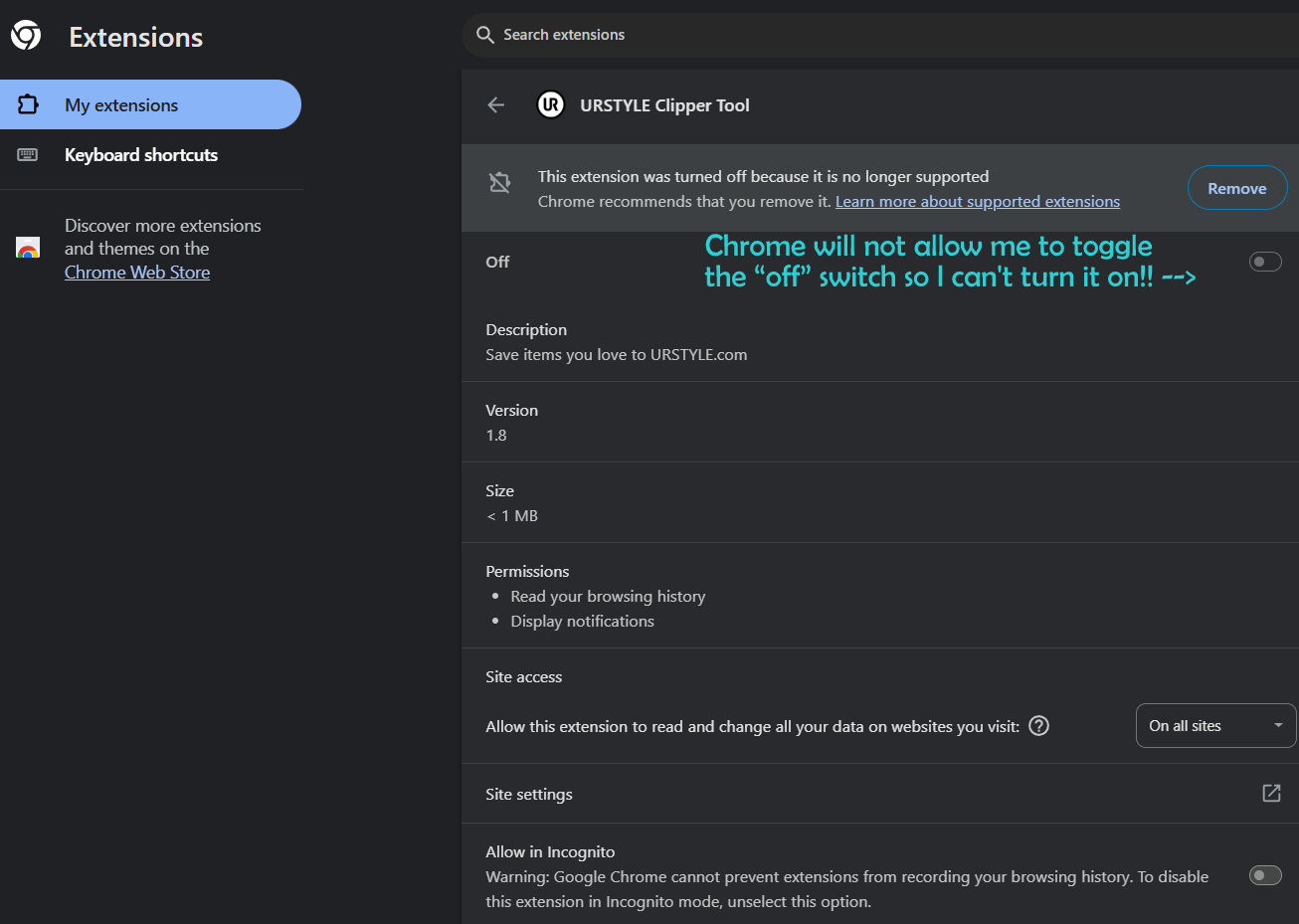
This next screen shot is from Chrome Webstore Help online:
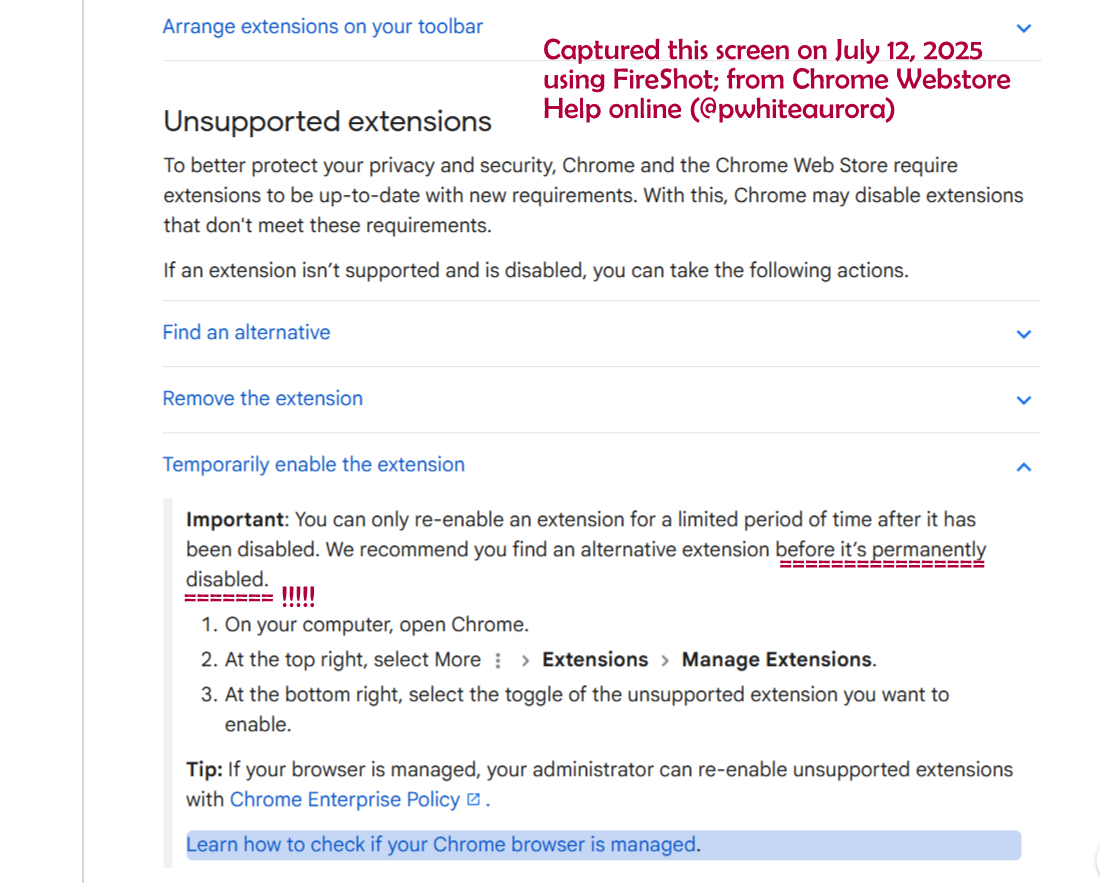
NOTICE IT SAYS THE TEMPORARY RE-ENABLE is allowed for a "limited period of time after it has been disabled." SO NOW WHAT???? URSTYLE'S Administrator does not seem to read our posts on these issues.... ANY OTHER SUGGESTIONS?
Feedback would be much appreciated!!
Thanks so much, Paulette -
@pwhiteaurora Mine is still working. One thing you can do while I work to find a solution is download the image as a PNG. Then you can upload it to ITEMS. You'll likely need (gulp) an Extension for Chrome, but it works beautifully:
https://chromewebstore.google.com/detail/save-image-as-png/nkokmeaibnajheohncaamjggkanfbphi?hl=en
-
@pwhiteaurora Just wanted to touch base to let you know that Chrome wants to do an update and I always do them. I fear I may now lose my Clipper too! I'm going to see what I can find out about that update and if any other browsers support the extension. YIKES!
-
@pwhiteaurora UPDATE: URSTYLE Clipper Tool is on the list of Extensions no longer being supported by Chrome. It is in the latest update and often, Chrome automatically updates on its own. Most people do not set Chrome to alert them first. I'm a computer geek so I do. Here's the list.
https://tooltivity.com/extensions/no-longer-supported-v2-manifest
-
"This extension is no longer available because it doesn't follow best practices for Chrome extensions."
So, if you've already deleted it, you can no longer download it now. However, before I deleted it, Chrome refused to let me use it. Unless they update the clipper tool to "follow best practices for Chrome extensions," it doesn't exist anymore for Chrome. Chrome made me get rid of it in June (2025).
That being said, it still appears to work on Mozilla Firefox, but I'm unsure about other browsers. I'm not sure about other browsers, though.
Just FYI for anyone looking for answers.

-
Today Google Chrome removed the clipper tool extension completely and there is no alternative.

-
@wacky-workshop Haven't tried this yet. You'll need to download Firefox and the this extension.... IF it works!

-
I may be late to the party, but I use firefox and I had the clipper installed but hadn't been on here in months and now when I click on it it says the clipper cannot be used on urstyle! I do not understand why!!! Idk what to do now
-
08.10.25 I started using the browser Opera today, installed clipper and it seems to work pretty well. When I was installing the clipper extension it did say that the extension might not be supported for much longer with Opera. At least it's another option for now.
-
I had it by default awhile ago and then it basically removed itself. If you go to the web store they literally tell you it doesn't work with the system anymore:
"This extension is no longer available because it doesn't follow best practices for Chrome extensions."
I wonder if we should contact either Chrome or UrStyle to get that fixed? I know I am.
And for personal reasons Safari currently doesn't work on my Mac so that's out of the question. I don't think the clipper works on Safari anyway. -